
Quarterly Estimated Taxes in Money Pro
Money Pro calculates your quarterly estimated tax payment in real time based on your year-to-date income and expenses. Access it in the Taxes → Quarterly tab. The estimate covers self-employment tax (15.3%) and federal income tax. You pay directly to the IRS at eftps.gov — Money Pro does not submit payments on your behalf.

Why You Need to Pay Quarterly
As a self-employed individual or LLC owner, the IRS requires you to pay taxes as you earn income — not just once in April. This is the "pay-as-you-go" system. If you owe more than $1,000 in taxes at year-end after withholding, you're subject to an underpayment penalty (currently 8% annually).
Quarterly estimated taxes cover:
- Self-employment tax: 15.3% (Social Security 12.4% + Medicare 2.9%)
- Federal income tax: Based on your net profit and tax bracket
- State income tax: Most states with income tax also require quarterly state payments (handled separately through your state's tax authority)
2025 and 2026 Quarterly Due Dates
| Quarter | Income Period | Due Date |
|---|---|---|
| Q1 | January – March | April 15 |
| Q2 | April – May | June 15 |
| Q3 | June – August | September 15 |
| Q4 | September – December | January 15 (next year) |
How Money Pro Calculates Your Estimate
- Totals your year-to-date business income from transactions and paid invoices
- Subtracts your year-to-date business expenses (categorized transactions)
- Calculates net profit
- Applies self-employment tax (15.3%)
- Estimates federal income tax based on your bracket
- Shows you the quarterly payment amount

Important: The estimate is only as accurate as the data in Money Pro. Income from PayPal, cash, or accounts not linked to Money Pro won't be included. If you have W-2 income alongside self-employment income, add it to your Tax Profile so it's factored in.
Recording a Tax Payment You Made
When you pay your quarterly taxes, record the payment so Money Pro's estimates stay accurate:
Method 1 — From the Expenses page:
Find the transaction for the tax payment in your bank feed and mark it as a tax payment.

Method 2 — Manual entry:
1. Go to Taxes → click + Tax Payment

2. Enter the date, amount, and payment type
3. Save
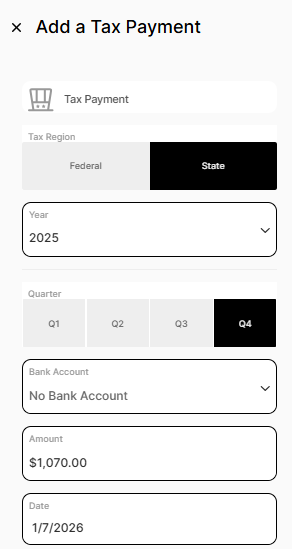
Use Method 2 if you paid from a personal bank account not linked to Money Pro.
How to Make the Actual Payment to the IRS
Money Pro does not submit tax payments to the IRS. You pay directly:
- Federal: eftps.gov (Electronic Federal Tax Payment System — free, requires one-time enrollment) or IRS Direct Pay
- State: Your state's tax authority website (search "[your state] estimated tax payment")
Set up EFTPS before your first quarterly payment — enrollment takes 1–2 business days to activate. Don't wait until the due date.
Frequently Asked Questions
How accurate are Money Pro's quarterly tax estimates?
They're based solely on data you've entered in Money Pro. If you have income from other sources, outstanding invoices not yet recorded, or unlinked bank accounts with business transactions, the estimate will be understated. For a definitive quarterly payment calculation, work with your accountant — especially in your first year of business.
What if I can't afford the full quarterly payment?
Pay as much as you can. The IRS penalty for underpayment is 8% annually on the unpaid amount — it's better to pay something than nothing. You can also avoid penalties by paying at least 100% of last year's tax (110% if your income was over $150,000) — this is the "safe harbor" rule.
I overpaid my quarterly taxes. What happens?
If you overpay across the year, you'll get a refund when you file your annual return, or you can apply the overpayment to next year's estimated taxes. This is a normal outcome for business owners whose income varies by quarter.