
How to Track Business Mileage in Money Pro
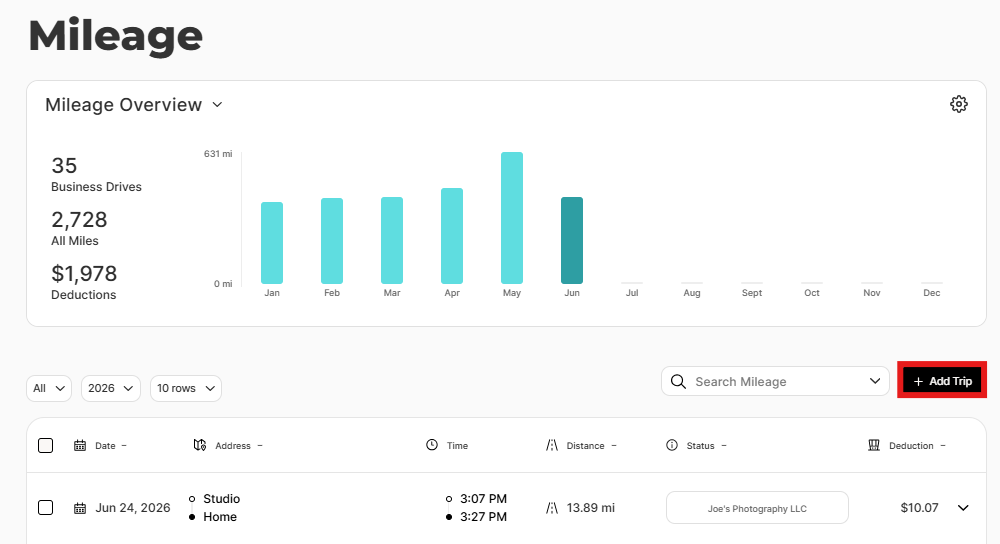
To log a business trip in Money Pro, go to the Mileage tab in Money Pro, click + New Trip, enter the start and end addresses, the miles driven, the trip date, and the business purpose, then save. Money Pro automatically calculates your tax deduction using the current IRS standard mileage rate. Tracking is manual — there is no automatic GPS recording.
Current IRS Standard Mileage Rates
| Tax Year | Rate Per Mile |
|---|---|
| 2025 | $0.70 (70 cents) |
| 2026 | $0.725 (72.5 cents) |
Money Pro applies the correct rate based on the trip date automatically.
Step-by-Step: Log a Business Trip
Mobile app (recommended — log trips immediately after each drive):
- Open the ZenBusiness app → tap Money Pro → Mileage
- Tap + New Trip
- Enter the From address (or select a saved favorite)
- Enter the To address (or select a favorite)
- Enter the miles driven (manually) — or enter odometer start/end and Money Pro calculates
- Set the trip date (defaults to today; backdate if needed)
- Select Business or Personal
- Select your vehicle (if you've set up multiple)
- Optionally select the client the trip is associated with
- Tap Save Details
Your deduction appears immediately (e.g., 25 miles × $0.725 = $18.13).
Web (same flow at zenbusiness.com → Finance → Money Pro → Mileage tab)
Round Trips
For trips that go from A to B and back to A, use the Round Trip feature to automatically create the return leg:
- Manually enter the first leg of the drive
- Click the Round trip button
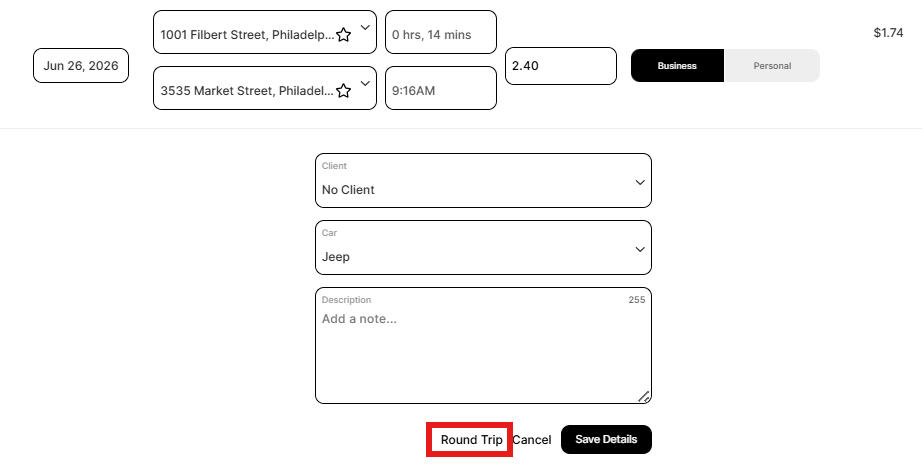
- Confirm you want to save the first leg and create the return trip
- Click Save Details to save the return leg
What the IRS Requires for Each Trip
The IRS requires 5 elements for a valid mileage record:
- Date of the trip
- Destination (city or address)
- Business purpose (be specific — "Client meeting at ABC Corp" not just "Meeting")
- Miles driven for the trip
- Total annual miles on the vehicle
Money Pro captures all five when you complete the trip form. The business purpose field is the most commonly skipped — fill it in specifically for every trip.
Set Up Vehicles
Add each vehicle you use for business:
1. Mileage tab → gear icon → Cars
2. Click Add Car → enter nickname, make, model, year, and optional odometer reading
3. Save — select this vehicle when logging trips
Save Favorite Locations
Save frequent destinations (your office, client sites, suppliers) to speed up trip logging:
1. Mileage tab → gear icon → Favorite Locations
2. Click Add New Favorite Location → enter a name and address → Save
Mileage Reports
To export your mileage log for taxes:
1. Mileage tab → gear icon → Reports
2. Choose a report type:
- Business Mileage by Business — total miles and deduction per business
- Business Mileage by Client — breakdown by client
- Mileage Detail List — downloadable spreadsheet with every trip (what your accountant needs)
- Personal Mileage by Category — personal driving logged
3. Set date range → Download as PDF or CSV

Frequently Asked Questions
Does Money Pro track mileage automatically with GPS?
No — Money Pro uses manual mileage tracking only. You log each trip yourself after completing the drive. The ZenBusiness mobile app supports mileage tracking but does not automatically detect when you're driving.
Can I log trips I forgot to record?
Yes — backdate the trip entry to any past date. The IRS prefers same-day ("contemporaneous") records, but retroactive logging is better than no record. Use your calendar, Google Maps history, or meeting invites to reconstruct forgotten trips accurately.
What counts as deductible business mileage?
Driving to client meetings, delivering products, traveling to a temporary work location, going to the bank or post office for business purposes. NOT deductible: your regular commute from home to your office, personal errands.
Standard mileage vs. actual vehicle expenses — which should I use?
Compare both for your situation. Standard mileage ($0.725/mile for 2026) is simpler. Actual expenses (gas, insurance, repairs, depreciation × business-use percentage) may be higher for older, less fuel-efficient vehicles. Toggle the setting in your Tax Profile to see which method reduces your estimated taxes more. Consult your accountant — once you choose actual expenses for a vehicle in its first year of use, you generally can't switch to standard mileage for that vehicle.