
My Bank Is Linked in Money Pro but I Don't See Any Transactions
If your bank shows as connected in Money Pro but no transactions appear, the most common causes are: the initial sync is still in progress, the transactions are still pending at your bank, the start date is set too recent, or there's a token mismatch between Plaid and Money Pro's backend that requires a support fix. Pending transactions do not appear until they post; after posting, external Plaid-connected banks usually sync within 24 hours.
Step 1 — Wait for the Initial Sync
When you first link a bank account, Money Pro imports transaction history. This takes time:
- Recent posted transactions: usually appear within a few hours and up to 24 hours after the first connection
- Older transaction history: depends on what your bank shares and may require the historical import option
- Pending transactions: do not appear until they fully post to your bank — pending charges are excluded by design
- New purchases after linking: often feel like a 3–5 business day delay because the bank may take 1–3 business days to post the charge before Money Pro can sync it
If you just linked your account, wait the full 24 hours before troubleshooting missing posted transactions. If the transaction is still pending at your bank, wait until it posts first.
Step 2 — Check Your Account Start Date
Money Pro uses a "start date" to control how far back it imports transactions. If the start date is set to today, only future transactions will appear.
How to check and fix the start date
- Log in at zenbusiness.com
- Go to Finances → Money Pro → Money out (or Money in)
- Click the gear icon in the top right
- Select Banks & Integrations
- Find your bank and click it
- Look for Start Date — change it to a date before your oldest transaction

- Click Save
After changing the start date, click Sync or Pull Older Transactions if that option is available.
Step 3 — Sync or Reconnect the Account
If the start date looks correct and transactions still haven't appeared after 24 hours:
- Go to Finances → Money Pro → Money out → gear icon → Banks & Integrations
- Click the gear icon next to your bank
- Select Sync to force a refresh

- If there's no sync option, try Disconnect and reconnect through Plaid — choose the same accounts you originally selected
ZenBusiness Banking users: Do not disconnect and reconnect your ZenBusiness Banking account. Doing so can disrupt your transaction history and make troubleshooting harder. Contact our support team instead.
Step 4 — Contact Support (Token Mismatch)
If your bank still shows as connected but has zero transactions after reconnecting, the cause is likely a token mismatch between Plaid and Money Pro's backend — a backend issue that cannot be fixed by the customer. This is the most common cause of "connected but empty" accounts that don't resolve on their own.
Contact our support team and include:
- The name of the bank you connected
- Approximately when you linked it
- What you've already tried
Support can diagnose and repair the Plaid/backend connection on their end.
Manually Import Transactions (While You Wait)
If you need your transaction history right away and can't wait for support, you can manually import transactions from your bank:
- Download a CSV or OFX statement from your bank's website (usually under Statements or Account History)
- In Money Pro, go to Settings → Import Data → Import CSV
- Map your columns (date, description, amount) to Money Pro's fields
- Preview and confirm the import
See How to Import Transactions via CSV for the full walkthrough.
Frequently Asked Questions
How long does it take for transactions to appear after linking a bank?
For external banks through Plaid, recent posted transactions usually appear within a few hours and up to 24 hours after the first connection. New purchases do not appear while they are pending at your bank; once they post, Plaid-connected banks usually sync them to Money Pro within 24 hours. ZenBusiness Banking direct connections often sync faster, but pending transactions still need to post first.
Why don't I see pending transactions?
Money Pro only imports transactions that have fully settled in your bank. Pending charges (authorized but not yet posted) are excluded to prevent importing amounts that might change or reverse. Once a pending transaction posts to your bank, external Plaid-connected banks usually sync it to Money Pro within 24 hours.
My bank shows a red error icon. Is that related?
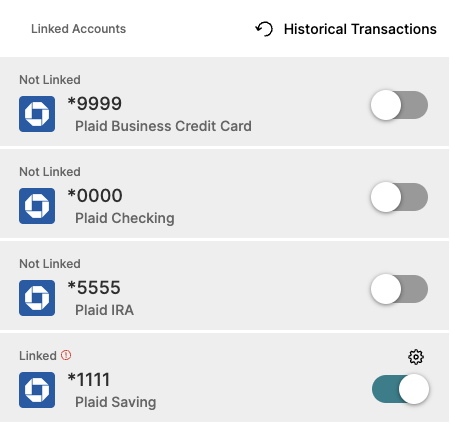
A red error icon usually means your bank credentials expired — most banks require re-authentication through Plaid every 60–90 days. Click Reconnect next to the error icon and re-enter your online banking credentials. This is different from "connected but no transactions" — an error icon means the connection broke, while "connected with 0 transactions" means the connection is active but data isn't flowing.
I connected my bank weeks ago and never saw a single transaction.
This is almost certainly a backend token mismatch. Contact our support team — the fix requires a backend action on your account that can't be done from the customer side.
I have ZenBusiness Banking and it's not showing up in Money Pro.
ZenBusiness Banking links to Money Pro automatically via a direct connection — you shouldn't need to search for it in Plaid. If your ZenBusiness Banking transactions aren't appearing, go to Banking → Connected Accounts and look for a "Fix Connection" prompt. If the connection is missing entirely, contact our support team — accounts from certain onboarding paths need manual backend setup.
A synced transaction doesn't match my bank statement — wrong amount, a duplicate, or one that shouldn't be there.
First compare the transaction directly against your bank's own transaction history for that date to confirm the mismatch is real. If it looks like a duplicate, check whether it's the same charge showing once as pending and once as posted — that often clears on its own once the bank finishes settling it. If the amount, description, or presence of the transaction still doesn't match your bank statement after checking, contact our support team with the transaction date, amount, and bank name so it can be investigated.
Related Articles
- How to Connect Your Bank Account to Money Pro
- How to Import Transactions via CSV
- Is It Safe to Link My Bank Account to Money Pro?
Still need help? If you still have questions our support team is happy to help!