
Record Direct Invoice Payments Outside Stripe in Money Pro
A direct payment means your client pays you outside Stripe, such as by check, cash, ACH, wire, Zelle, or another bank transfer. In Money Pro, you still need to mark the invoice paid and connect it to the bank transaction or manually record the payment so your invoice status, income, and bank records stay aligned.
Direct Payment vs. Stripe Payment
Money Pro supports invoices that customers can pay online through Stripe when online payments are enabled. But not every client pays through Stripe. Some pay directly.
| Payment type | What happens |
|---|---|
| Stripe card or ACH payment | Client pays through the invoice payment link; Stripe processes the payment and payout reconciliation may happen automatically. |
| Direct payment | Client pays outside Stripe; you manually record or link the payment in Money Pro. |
| Cash or check | You deposit the money and match or record the invoice payment. |
| Bank transfer / wire / ACH outside Stripe | The bank deposit syncs to Money Pro and should be linked to the invoice. |
Direct payment does not mean the invoice is unpaid. It means payment happened outside the Stripe checkout flow.
Mark an Invoice Paid When the Client Pays Directly
Use this when the client paid by check, cash, bank transfer, or another non-Stripe method.
Recommended workflow:
- Open the invoice in Money Pro.
- Confirm the amount the client paid.
- If the bank deposit has already synced, choose the option to add or link a bank transaction to the invoice.
- Select the matching deposit.
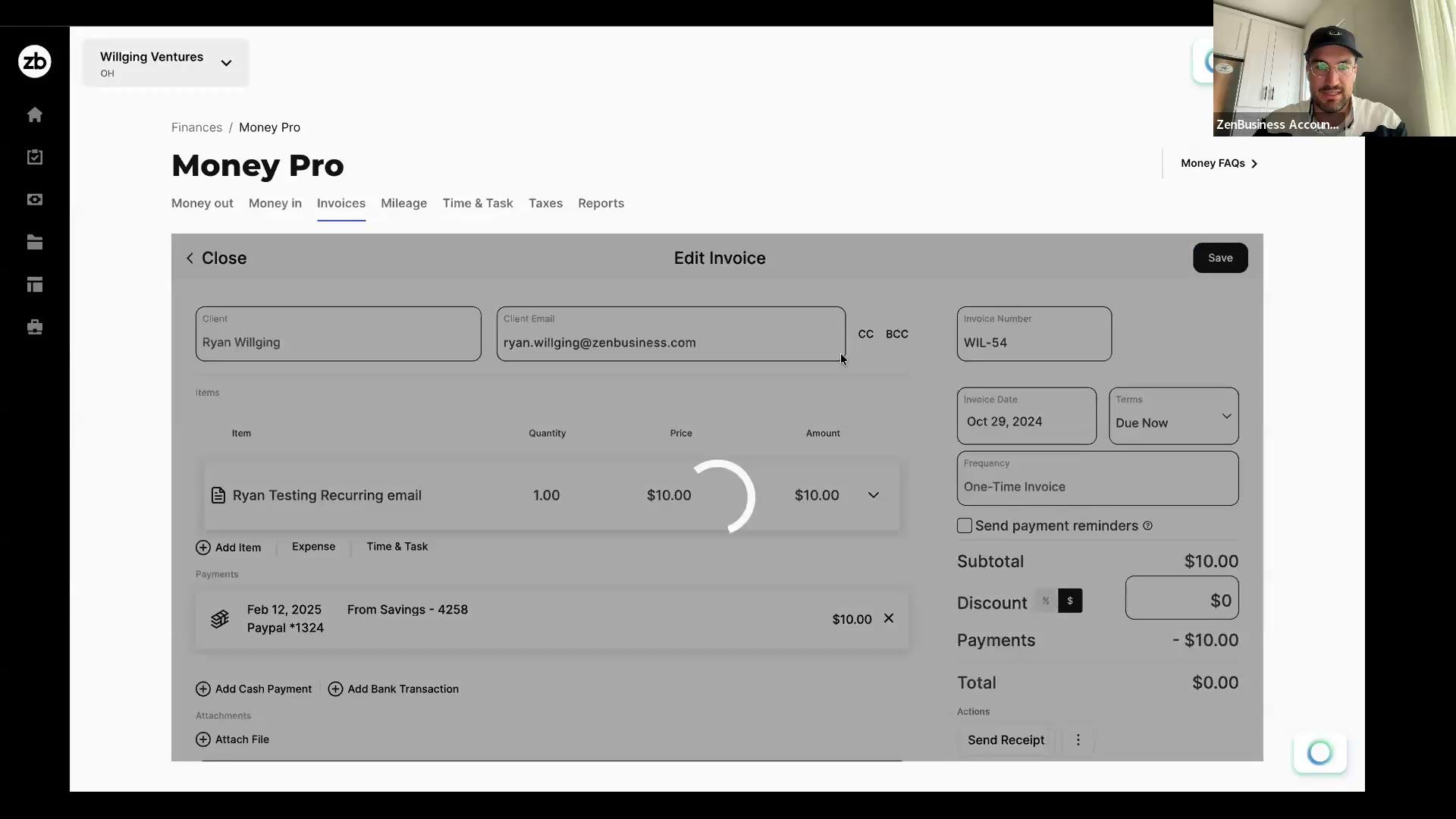
- If the deposit has not synced yet, record the payment manually or wait for the bank transaction to post.
- Confirm the invoice status changes to Paid.
- Review the related bank transaction to make sure it is not also categorized as separate income.
The key is to avoid double-counting. The invoice creates the income record; the deposit is the cash settlement.
Record Cash and Check Payments
For checks, wait until the check is deposited and the bank transaction appears if possible. Then link the deposit to the invoice. If you need to mark the invoice paid before the bank syncs, keep a note and reconcile it once the deposit appears.
For cash, record the payment in a way that matches how the cash was handled:
- If you deposit the cash into a business bank account, link the deposit to the invoice.
- If you keep a cash-on-hand record, use the appropriate account or manual transaction workflow.
- Keep receipts or notes showing who paid, how much, and what invoice was paid.
Cash payments need extra documentation because there may not be a payment processor record.
Avoid Duplicate Income
Duplicate income is the most common direct-payment mistake. It happens when the invoice is marked paid and the bank deposit is also categorized as new Services Income.
To fix it:
- Open the bank deposit.
- Remove the standalone income category if it duplicates the invoice.

- Link the deposit to the invoice instead.
- Save.
- Run the Profit & Loss report again.
- Confirm income is counted once.
If one deposit covers multiple invoices, link the deposit to all invoices included in that payment when the workflow supports it.
When the Deposit Doesn't Match Your Invoice Total
Even for a Stripe payment, the deposit that lands in your bank account doesn't always match your invoice total exactly — usually because of a processing fee, a partial payment, or (less often) a tip or overpayment. Money Pro doesn't currently auto-match a deposit that's off by any amount, so you link it yourself with Add Bank Transaction, then handle the difference depending on why it's there:
- The gap is a processing fee, or your client paid through a different method than your connected Stripe account: link the deposit to the invoice with Add Bank Transaction as usual, then record the leftover difference as a separate expense entry (a processing/merchant fee category) so your books reflect the fee instead of showing the invoice as short-paid.
- Your client only paid part of the invoice: open the invoice and use Add Cash Payment or Add Bank Transaction, entering the actual amount received rather than the full invoice total. The invoice updates to Partially Paid, showing the remaining balance. On accrual accounting, the invoice stays open with that balance until the rest of the payment arrives — that's expected.
- The deposit is larger than the invoice — a tip or overpayment: there's currently no dedicated way to record a tip or overpayment on a Money Pro invoice. Link the amount that matches the invoice with Add Bank Transaction, and record the extra as a separate manual income entry rather than leaving it unaccounted for. Check with your accountant on how they want the extra amount categorized.
This whole area is something we know is more manual than it should be, and we're aware of it — this is the current workaround, not the intended long-term experience.
Frequently Asked Questions
What does direct payment mean in Money Pro?
Direct payment means the customer paid outside Stripe. Examples include check, cash, bank transfer, ACH outside Stripe, wire, Zelle, or another method. You still need to mark or link the invoice payment in Money Pro.
Does direct payment turn off Stripe?
Direct payment does not remove Stripe from your account. It only means that specific invoice was paid outside the Stripe payment link. You can still use Stripe for other invoices if online payments are enabled.
How do I mark a check payment as paid?
Deposit the check into your business bank account, wait for the deposit to sync, then link the deposit to the invoice. If you mark the invoice paid before the deposit syncs, add a note and reconcile it when the bank transaction appears.
How do I record a cash payment?
Record the payment against the invoice and keep a receipt or note. If you deposit the cash, link the bank deposit to the invoice. If you keep cash on hand, use the manual transaction or cash account workflow your accountant recommends.
Why is my income duplicated after I marked an invoice paid?
The bank deposit may also be categorized as Services Income. Link the deposit to the invoice instead of leaving it as standalone income. The invoice should create the income; the deposit should show the cash movement.
What if one bank transfer paid multiple invoices?
Open the deposit and link it to all invoices included in the payment if the workflow supports multiple invoice selection. If you cannot match it cleanly, export the invoice and deposit details and ask support or your accountant how to reconcile that payment.
Related Articles
- Money Pro Invoicing
- How to Accept Online Payments
- How to Create and Send Invoices
- Transaction Management in Money Pro
Still need help? If you still have questions, contact our support team.