
Mileage Tracking in Money Pro
How to log business trips, meet IRS requirements, and maximize your mileage deduction.
Overview
If you drive for business — visiting clients, making deliveries, attending meetings, picking up supplies — those miles are a legitimate tax deduction. The IRS allows you to deduct business mileage using the standard mileage rate: a flat per-mile amount set each year. For most small business owners, this is simpler and often more valuable than tracking actual vehicle costs.
Money Pro's mileage tracker lets you log business trips and generate the documentation the IRS requires. You enter where you drove, how many miles, and the business purpose — Money Pro calculates your deduction automatically at the current IRS rate.

Important before you start: Money Pro uses manual mileage tracking only. There is no automatic GPS tracking running in the background. You log each trip yourself — ideally at or near the time you take it. The IRS calls this "contemporaneous record-keeping," and same-day logging is your strongest audit defense. Mileage tracking is available in both the ZenBusiness mobile app and on the web.
Current IRS standard mileage rates:
- 2025: $0.70 per mile (IRS Notice 2025-2)
- 2026: $0.725 per mile (IRS Notice 2025-70)
What Counts as Deductible Business Mileage?
The IRS is specific about which driving qualifies:
Deductible:
- Driving to meet a client or customer
- Traveling to a temporary work location
- Driving between two business locations
- Going to the bank, post office, or supply store for business
- Driving to a business conference, training, or industry event
Not deductible:
- Commuting from home to your regular office (even if you work from home sometimes)
- Personal errands — even if near a work destination
- Driving to a permanent second work location
Home office exception: If your home qualifies as your principal place of business (you claim the home office deduction), trips from your home to client locations and other work sites may be deductible. Ask your accountant if this applies to you.
Setting Up Vehicles
Set up each vehicle you use for business before logging trips:
- Go to Money Pro → Mileage Tracker
- Click the gear icon → Cars
- Click "Add Car"
- Enter: nickname, make, model, vehicle year, whether it's your primary car, and optional odometer year and reading
- Save — this vehicle is now available when logging trips
You can add multiple vehicles. When logging a trip, select which vehicle you used.
Saving Favorite Locations
Save your office, frequent client sites, and other common destinations so you can select them in one tap instead of typing each time:
- Go to the Mileage Tracking page
- Click the gear icon → Favorite Locations
- Click "Add New Favorite Location"
- Enter a name and address → Save
Your saved favorites appear in the location selector when logging a new trip.

How to Log a Trip
In the Mobile App (Recommended)
Log trips right after each drive while the details are fresh:
- Open the ZenBusiness app → Money Pro → Mileage
- Tap + New Trip
- Enter the "From" address (or select a saved favorite)
- Enter the "To" address (or select a favorite)
- If Distance and Duration don't auto-fill, enter the miles manually (or enter odometer start/end readings — Money Pro calculates the distance)
- Select Business or Personal
- Select which business the trip was for (defaults to your primary business)
- Optionally select the client the trip is associated with
- Select or enter the vehicle
- Tap "Save Details"
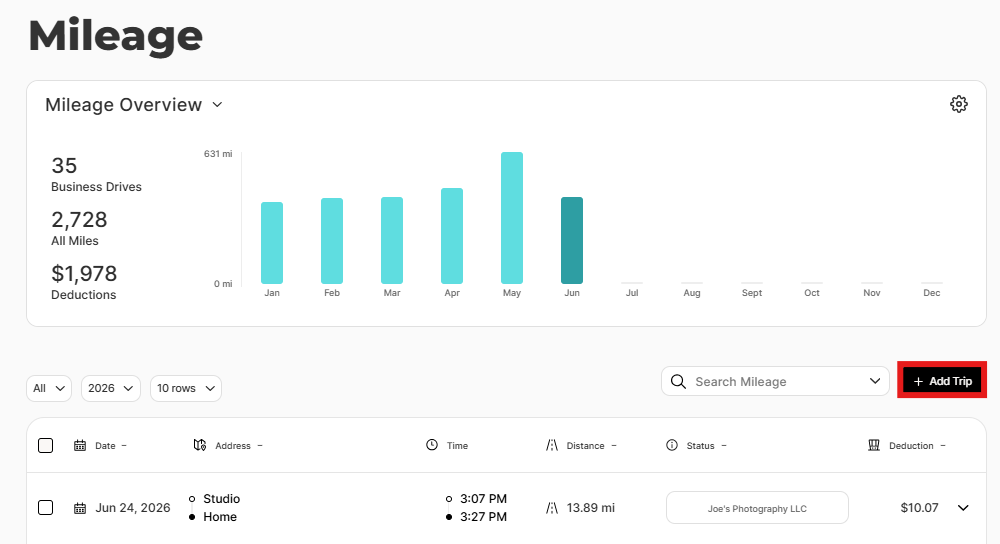
Money Pro shows your deduction immediately (miles × current IRS rate).
On the Web
- Log in at zenbusiness.com → Finance → Money Pro
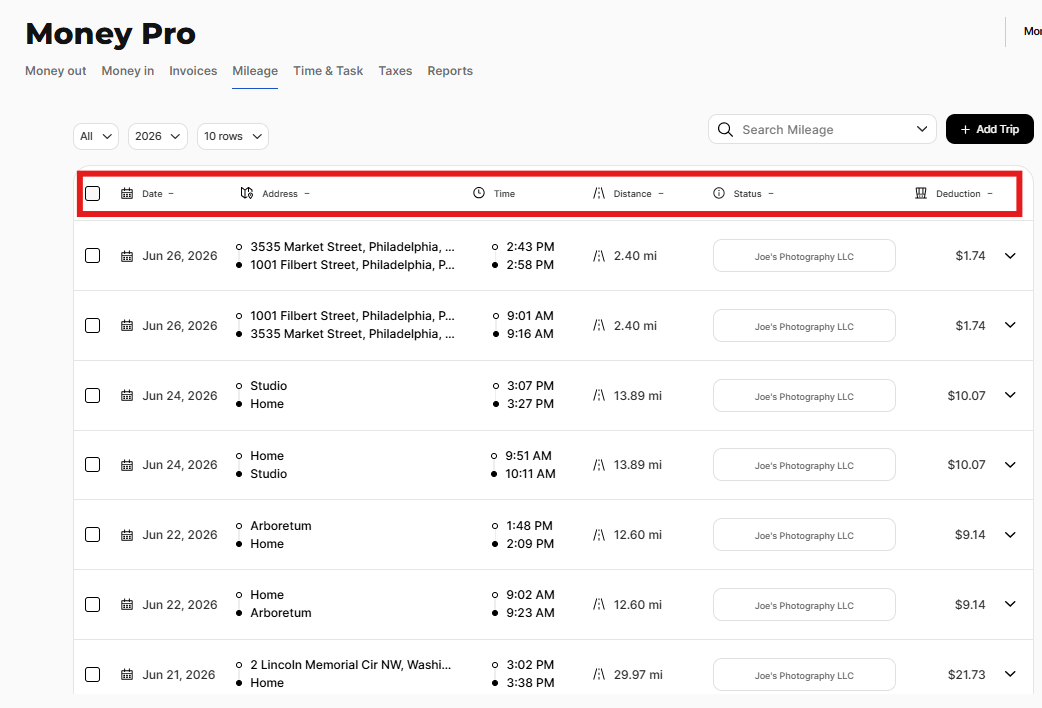
- Click the Mileage tab → + New Trip
- Follow the same steps as the mobile app above
What the IRS Requires
Five elements must be documented for each business trip:
- Date of the trip
- Destination (address or general location)
- Business purpose (what business was conducted — be specific)
- Miles driven for that trip
- Total annual miles on the vehicle (for calculating your business-use percentage)
Money Pro captures all five. The most commonly missed element is business purpose — document it specifically. "Errand" won't hold up in an audit. "Bank deposit for January invoices" will.
Standard Mileage vs. Actual Auto Expenses
The IRS gives you two ways to deduct vehicle use — you can choose whichever results in a lower tax bill:
- Standard mileage rate: Multiply your business miles by the IRS rate (Money Pro tracks this automatically)
- Actual auto expenses: Deduct the business-use percentage of real vehicle costs — gas, insurance, repairs, depreciation
To compare both methods and toggle your preference, go to your Tax Profile in the Taxes section. Look for the "Use Mileage Deduction" setting — toggling it updates your estimated tax calculations so you can see which method benefits you more. Money Pro handles the standard mileage rate calculation automatically; your accountant or tax software applies the actual expense method at filing time.
Mileage Reports
Generate your mileage report for tax time:
- Go to Mileage Tracking → gear icon → Reports
- Select the report type:
- Business Mileage by Business — total business miles and deduction per business
- Business Mileage by Client — breakdown of business miles by client
- Mileage Detail List — downloadable spreadsheet with every trip: date, from, to, purpose, miles, deduction
- Personal Mileage by Category — summary of personal driving logged
- Select your date range (typically January 1 – December 31 for annual filing)
- Download as PDF or CSV
The Mileage Detail List is the report your accountant needs — it contains the per-trip log with all five IRS-required fields.

Tips for Staying on Top of Mileage
- Log immediately after the trip — five minutes after you park is much easier than reconstructing trips at month-end
- Use favorite locations — save your office and client sites to reduce logging time to a few taps
- Review monthly — open the Mileage tab at month-end and scan for any trips you may have missed
- Note your year-end odometer — record your vehicle's odometer reading on December 31. Your accountant may ask for it, especially if you're comparing standard vs. actual expense methods
Frequently Asked Questions
Does Money Pro track my mileage automatically with GPS?
No. Money Pro uses manual mileage tracking only — you log each trip yourself. Mileage tracking is available in the ZenBusiness mobile app, but it requires you to enter the trip details after each drive. It will not automatically detect or record your driving.
Can I log mileage for trips I already took but forgot to log?
Yes. You can backdate trips to any past date when adding a new mileage entry. The IRS prefers contemporaneous records (logged at or near the time of travel), but retroactive logging is better than no record. If reconstructing past trips, use calendar entries, meeting invites, or your phone's location history to verify dates and destinations.
What's the 2026 IRS mileage rate?
The IRS standard mileage rate for 2026 is $0.725 per mile (72.5 cents), per IRS Notice 2025-70. For 2025, the rate was $0.70 per mile. Money Pro automatically applies the correct rate based on the trip date.
Can I use both the standard mileage rate and actual auto expenses?
No — the IRS requires you to choose one method per vehicle per year. You can compare both in Money Pro's Tax Profile by toggling the "Use Mileage Deduction" setting and watching how your estimated taxes change. Once you choose a method and file using it, you generally must stick with it for that vehicle.
Can I track mileage for multiple vehicles?
Yes. Add each vehicle in Mileage → gear icon → Cars. When logging a trip, select which vehicle you used. Money Pro tracks mileage and deductions separately per vehicle.
Does commuting count as business mileage?
No. Regular commuting from your home to your primary work location is not deductible, regardless of how far you drive. The only exception is if your home qualifies as your principal place of business under the home office deduction — in that case, trips from home to client locations may count. Ask your accountant about the home office deduction if you work from home regularly.
What if I use the same car for personal and business trips?
That's normal. Only log business trips in Money Pro — personal trips aren't entered. At year-end, your business mileage divided by your total miles driven gives your business-use percentage, which is used for the actual expense method if that's what you choose. Note your year-end odometer reading — your accountant may ask for it.
My mileage report shows $0 in deductions. Why?
This usually means trips were logged as Personal instead of Business. Open the Mileage tab, find the affected trips, click to edit each one, and change the type to Business. Your deduction total will recalculate automatically.
Related Articles
Still need help?
Reach us via live chat on your dashboard or our support team. We're available Monday–Friday during business hours.